Add the object generator to C application and register it to factory
In this step you add the object generator in the C application of your Kanzi application and register it to factory.
Add the object generator
To add the object generator:
- Copy the dynamic_object_generator.c and dynamic_object_generator.h from <KanziWorkspace>/Tutorials/Object generator/Start here/src to <KanziWorkspace>/Projects/<ProjectName>/Application/src.
- Copy the list.txt from <KanziWorkspace>/Tutorials/Object generator/Start here/bin to <KanziWorkspace>/Projects/<ProjectName>/Application/bin.
This file contains the list of items that the object generator displays.
- In Visual Studio open the Visual Studio solution for your application located in <KanziWorkspace>/Projects/<ProjectName>/Application/configs/platforms/win32.
For example, if you named your Kanzi Studio project Object generator, Visual Studio solution is called Object_generator.sln.
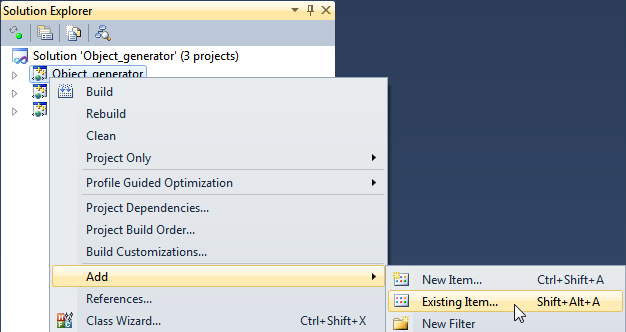
- In Visual Studio right-click the Dynamic_object_generator project, select Add > Existing Item..., go to <KanziWorkspace>/Projects/<ProjectName>/Application/src and add the dynamic_object_generator.c and dynamic_object_generator.h files to the project.
To learn how the object generator works open the dynamic_object_generator.c and read the comments in the code.
- (Optional) If you used different project name, property names, or animation clip name when you created the Kanzi Studio project in the first step of this tutorial, edit the dynamic_object_generator.c to use the same names.
/**
 * The name and location of the animation that is played when an object is highlighted.
 * You create the animation in the Kanzi Studio project of the application.
 * To get the correct path to the animation, in Kanzi Studio in
 * Library > Animations > Animation Clips right-click the animation clip you use
 * to highlight the selected object and select Copy as kzb URL.
 */
#define NAME_ANIMATION "kzb://object_generator/Animation Clips/Highlight"

/**
 * Factory string for object generator. The trajectory list box uses this generator by specifying
 * this name as the value for KZU_PROPERTY_TYPE_LIST_BOX_OBJECT_GENERATOR_TYPE_NAME.
 * In Kanzi Studio project set the property Object Generator to the same value used here.
 */
#define OBJECT_GENERATOR_FACTORY_STRING "ObjectGenerator"

/**
 * Name of the property that sets the resource ID of the prefab template that
 * is used to display objects in the trajectory list box.
 * You create this property in the Kanzi Studio project of the application.
 */
#define OBJECT_GENERATOR_PREFAB_TEMPLATE_PROPERTY_TYPE "ItemTemplate"

/**
 * The source file that contains the list of items that the object generator displays.
 * The object generator refreshes the items in the list when you save the file to disk.
 * The object generator reads the source file from the directory <KanziWorkspace>/Tutorials/
 * Object generator/Application/bin.
 * Note that you have to save the file in the UTF-8 format.
 */
#define OBJECT_SOURCE_FILE "list.txt"
Add the headers and register the object generator
To add the headers and register the object generator to factory:
- Open object_generator.c and include the Kanzi headers used by the object generator and the dynamic_object_generator.h header.
#include <application/kza_application_interface.h>
#include <application/kza_application.h>
#include <user/ui/factory/kzu_factory.h>
#include <user/ui/components/listbox/kzu_object_generator.h>
#include <core/memory/kzc_memory_manager.h>
#include "dynamic_object_generator.h"
- Register the object generator to factory.
KZ_CALLBACK static kzsError startupHandler(struct KzaApplication* application)
{
	kzsError result;
	struct KzuFactory* factory = kzaApplicationGetFactory(application);
	result = objectGeneratorRegisterToFactory(factory);
	kzsErrorForward(result);
	kzsSuccess();
}
- In the
kzApplicationConfigure function call the startupHandler function when your Kanzi application loads and set the window size of the application to 1280x720 pixels.configuration->onStartup = startupHandler;
configuration->windowProperties.width = 1280;
configuration->windowProperties.height = 720;
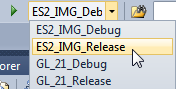
- In Visual Studio select one of the available solution configurations and run your application. For example, select the ES2_IMG_Release solution configuration.
(Optional) Create the toolmodule application for your Kanzi Studio project
To see in the Kanzi Studio Preview how the dynamic object generator works, you have to build the toolmodule application for your project in the your Visual Studio solution.
To create the toolmodule application for your Kanzi Studio project:
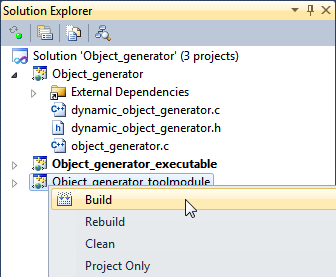
- In Visual Studio solution of your project build the Object_generator_toolmodule project.
By building the toolmodule project you create the toolmodule .dll Kanzi Studio uses as the application for the Preview.
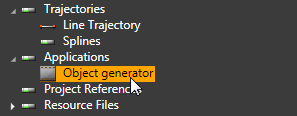
- In Kanzi Studio in Library > Applications select the application configuration for your project.
For example, if you named your project Object generator, select Object generator.
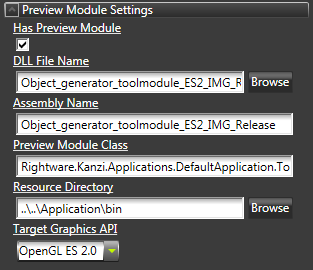
- In the Properties set properties:
- Enable the Has Preview Module property
- DLL File Name to the .dll you built in the first step
- Assembly Name to the same value as the DLL File Name, but without the .dll filename extension
- Resource Dictionary to the Application/bin directory
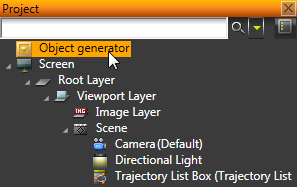
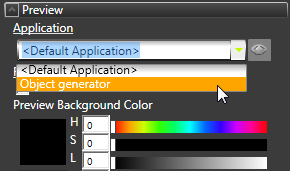
- In the Project select the Object generator project node and in the Properties set the Application to the application configuration that uses the toolmodule you build in the Visual Studio.
Kanzi Studio Preview now uses the toolmodule in the Preview.
< PREVIOUS STEP
See also
To find out more about what you can create using the Kanzi Engine API, see API reference.
To learn more about creating Kanzi applications, see Tutorials.
To find out more about Kanzi Studio features, see Working with ....
Open topic with navigation